Mobile Commons: May 2023 Release notes
Release Date
May 10, 2023
New Features
What’s New in this Release?
- View usage tracking data in the UI: new Allotments page
- Support for using SMS for multi-factor authentication
- Bug fixes and additional updates
View usage tracking data in the UI: new Allotments page
Mobile Commons is making it easier than ever to track your usage of SMS and MMS messages in the platform with the introduction of our new usage tracking feature. You can enable alerts to remind you when you have utilized most of your message allotments as well as keep an eye on usage directly in our new allotments page.
To open the new allotments page, select  Home from the left pane, and then select Allotments.

You can review the allotments that have been entered based on your contract for an overall view of your usage.
Support for SMS for multi-factor authentication (MFA)
Mobile Commons is committed to continually striving towards the best security practices. In keeping with this, we have added support for using SMS for multi-factor authentication. You can now enable SMS for MFA to apply across your company account (in addition to email MFA, which was released in January).
Note: Using SMS for MFA requires that users have provided a mobile phone number within their profile setup. For users without a mobile phone number, email will remain the default channel for MFA verification.
To enable SMS for MFA for your organization:
- On the title bar, select your account icon, and then select Configure Company.

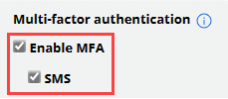
- On the Edit Firm page, go to the Multi-factor authentication section, select the Enable MFA checkbox and then select the SMS checkbox.
- When you are done, select Update at the bottom of the page.
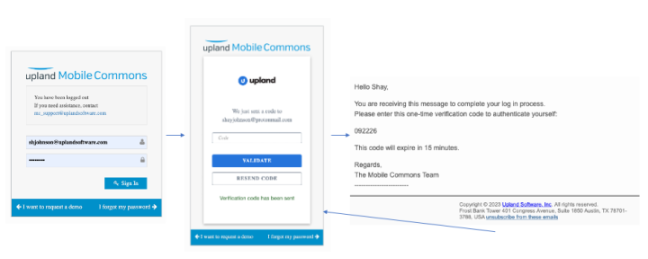
When users next log in, they will be prompted to provide validate their account with an access code that is emailed to them.
Bug fixes and additional updates
- Continued UI enhancements to update platform iconography.
- Added links to report data points listed in the dashboard.
- Upgraded the charting version used for reports.
- Addressed issue returning an error due to a number of expressions used to query for filtered groups.
- Addressed issue blocking the “received row from active schedule” from running properly.
- Addressed issue with active subscribers count for smart campaigns.
- Addressed issue with varying column orders returned for csv exports.
- Updated US government representatives that were missing after re-geocoding.